Build a pairing.
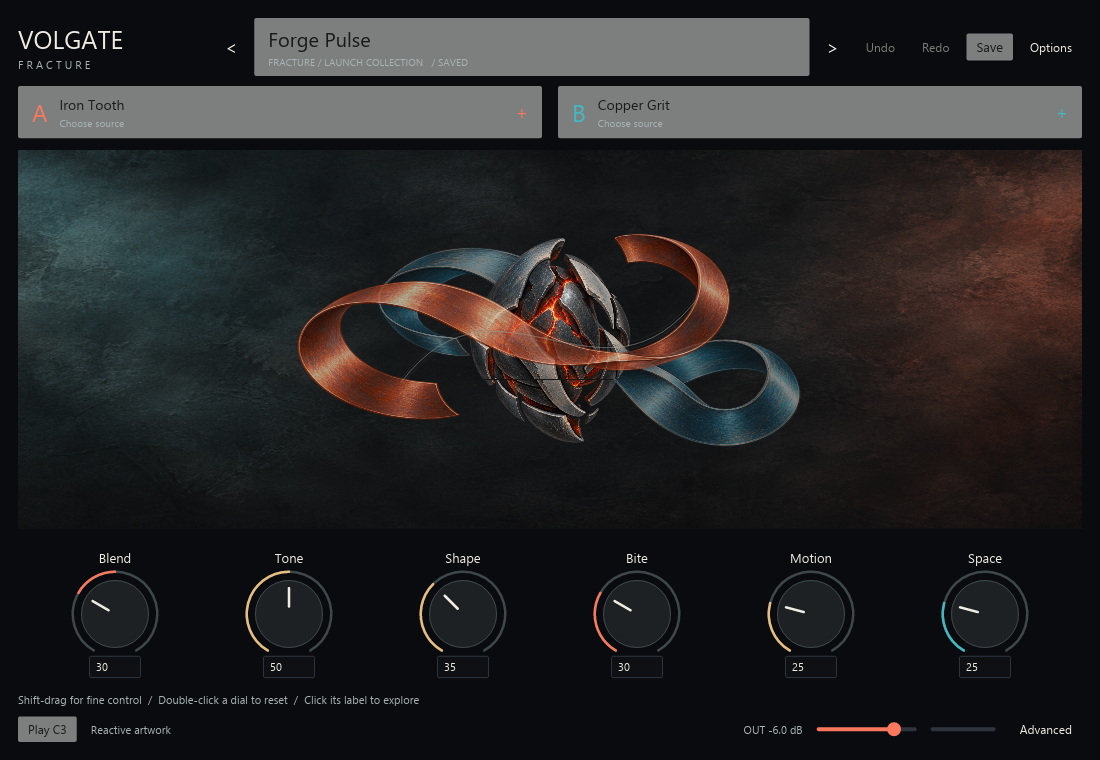
Choose a source for A and B. Each layer brings oscillators, filtering, envelopes, drive and rhythmic gating; Blend crossfades between them.
SEPARATE SOURCES, ONE INSTRUMENT
AUDIO PLUGINS / TWO-LAYER SYNTHESIZER
Two sources.
One new direction.
Combine two synthesis layers, then explore their character with Blend, Tone, Shape, Bite, Motion and Space. A visual instrument with deeper sound editing close at hand.
OPEN BETA
FIND YOUR BALANCE
Start with a sound, bring two sources together and follow the controls into your own variation.
Choose a source for A and B. Each layer brings oscillators, filtering, envelopes, drive and rhythmic gating; Blend crossfades between them.
SEPARATE SOURCES, ONE INSTRUMENTKeep Blend, Tone, Shape, Bite, Motion and Space in reach. Open Advanced for the layers, modulation, effects and macro mappings.
BROAD GESTURES, DEEPER EDITINGBrowse the eight original Fracture factory sounds, filter by category or role and save your own variations. Undo and Redo help you retrace a change.
BROWSE, EDIT, SAVEMADE TO BE PLAYED
Velocity, sustain, pitch bend and mod-wheel vibrato bring expression to the two-layer engine. Mono/legato and glide offer another way into a phrase.
Use a MIDI performance to shape the instrument, or try the editor’s Play C3 control while exploring a sound.
Independent delay and reverb sends give each layer a place around the core sound.
Browser and Advanced navigation preserve the loaded sound. Reduced motion keeps a still, parameter-shaped illustration.

VOLGATE PRESET PACK
Add 200 presets to Volgate’s eight factory sounds. Choose a starting point, then shape it with the six performance macros.
Requires Volgate 0.1.0. Get Volgate
Optional Ko-fi support before download.
200 presets across 11 style categories: 50 leads, 44 plucks, 39 pads, 31 textures, 22 basses and 14 sequences. They use Volgate’s synth engine and need no extra samples.
The Optional-Variants folder also contains alternate macro settings for four existing sounds. The installer adds the 200 main presets; try these variations separately through Options → Import a Volgate preset. Paste the variation’s JSON file path, click Import, then use Save As to keep a separate copy.
The current pack is also included in Everything for Volgate.
AVAILABILITY
Volgate 0.1.0 is available in open beta for Windows x64, with VST3, CLAP and standalone downloads. Listening review and broad DAW compatibility work continue during public testing.
Eight factory sounds are included. Explore Tonal Presets for 200 more starting points, or share feedback from your sessions.
OPEN BETA · Windows x64
Version 0.1.0 · 2026-10-15 · Build 2
Choose a format, add a pack, or get everything together.
Free to download. Ko-fi support is optional. Each download opens a short support window before the link becomes available.
All current Volgate Windows x64 formats and the optional preset pack.
Volgate 0.1.0 for Windows x64: VST3. Original instructions and licence notices included.
Volgate 0.1.0 for Windows x64: CLAP. Original instructions and licence notices included.
Volgate 0.1.0 for Windows x64: Standalone. Original instructions and licence notices included.
All supplied Volgate formats and utilities, with installation instructions and licences. Optional preset pack is a separate download.
Looking for more sounds? Explore Tonal Presets The current pack is also included in Everything for Volgate.
Previous Volgate 0.1.0 build 1. Preserved for existing installations; build 2 is the current download.
Original earlier archive, preserved with build 1. Its 200 presets and four optional revisions are byte-identical to the current pack.
A FEW GOOD QUESTIONS
Volgate uses a native synthesis engine. Sample playback and granular processing are not current features.
Volgate supports saving user variations and importing preset JSON. User sounds are separate from the factory collection.
Windows x64 is the documented build and test platform. macOS and Linux releases have not been verified.
INDEPENDENT, WITH INTENTION
Thoughtful feedback, real session notes and a little support all help us build better tools.